Shop - Setting Archive Item for Product Loop

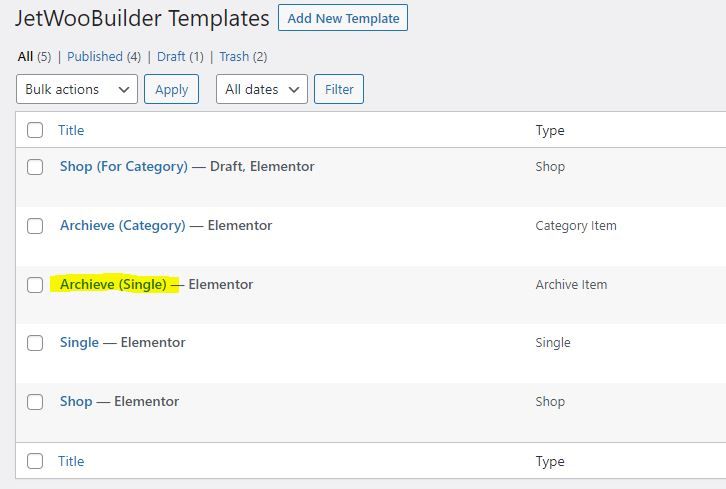
The format of product listed in product loop is controlled by template selected in the widget. It pulls from Jet Woo Builder Template – Archive Item.

See Image Guide

1. Create Archieve Item in Crocoblock > Woo Page Builder

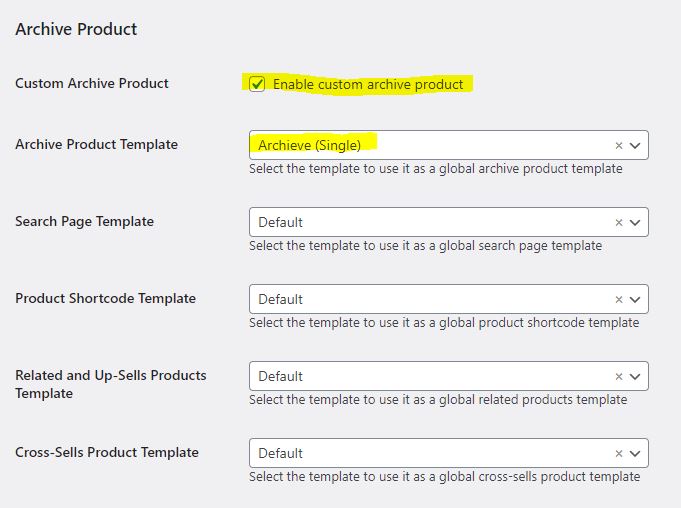
2. Then set it in The WooCommerce > Settings > Jet Woo Builder

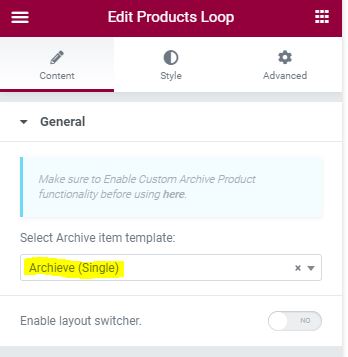
3. Set it in the Products Loop widget Content.

Product Page Title

Accessories

Product Loop

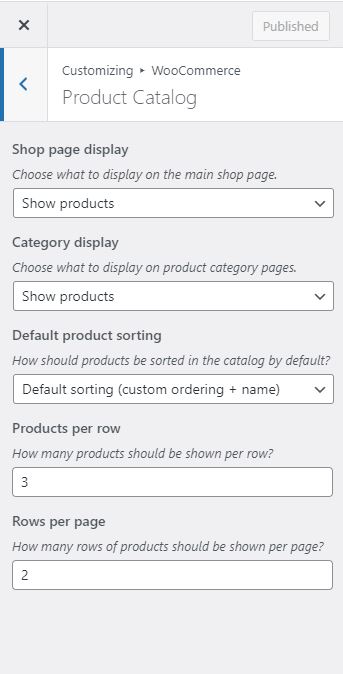
On Product Loops, the number of products listed is controlled in Appearance > Customize > Woocommerce > Product Catalog

Instead the custom made Product Loop, you can also use the preset in Product List / Product Grid widget and set it to be the view in your Shop page.

Below is Jet Smart Filter, not included in the jet Woo Builder, but are often used together.

  • Sale Badge :

    Sale!

    Title :

    Beanie with Logo

    Thumbnail :

    Categories :

    Tags :

      Excerpt :

      This is a simple product.

      SKU :

      Woo-beanie-logo

      Add To Cart :

      Stock Status :

      Price :

      Rp18.00

      Rating :

    • Sale Badge :

      Title :

      Sunglasses

      Thumbnail :

      Categories :

      Tags :

        Excerpt :

        This is a simple product.

        SKU :

        woo-sunglasses

        Add To Cart :

        Stock Status :

        Price :

        Rp90.00

        Rating :

      • Sale Badge :

        Sale!

        Title :

        Cap

        Thumbnail :

        Categories :

        Tags :

          Excerpt :

          This is a simple product.

          SKU :

          woo-cap

          Add To Cart :

          Stock Status :

          Price :

          Rp16.00

          Rating :

        • Sale Badge :

          Sale!

          Title :

          Belt

          Thumbnail :

          Categories :

          Tags :

            Excerpt :

            This is a simple product.

            SKU :

            woo-belt

            Add To Cart :

            Stock Status :

            Price :

            Rp55.00

            Rating :

          • Sale Badge :

            Sale!

            Title :

            Beanie

            Thumbnail :

            Categories :

            Tags :

              Excerpt :

              This is a simple product.

              SKU :

              woo-beanie

              Add To Cart :

              Stock Status :

              Price :

              Rp18.00

              Rating :

            Products Ordering

            Products Navigation

            A Very simple Pagination widget, can only show Next / Previous (very similar to pagination but without the page)

            Products Pagination

            Upgrade from Products Navigation, but if you use jet smart filter, use the jet smart filter’s pagination widget instead because it can target reload type (Ajax, page reload, Mixed).

            Mixed is Ajax, but the url is changed so no actual page reload.

            Products Result count

            For now it can only be accurate if using page reload method because this widget can’t reload on AJAX.

            But later maybe we can use Jet Engine’s Query builder to make it possible
            Showing all 5 results

            Products Description

            This is Description

            Products Notices ???