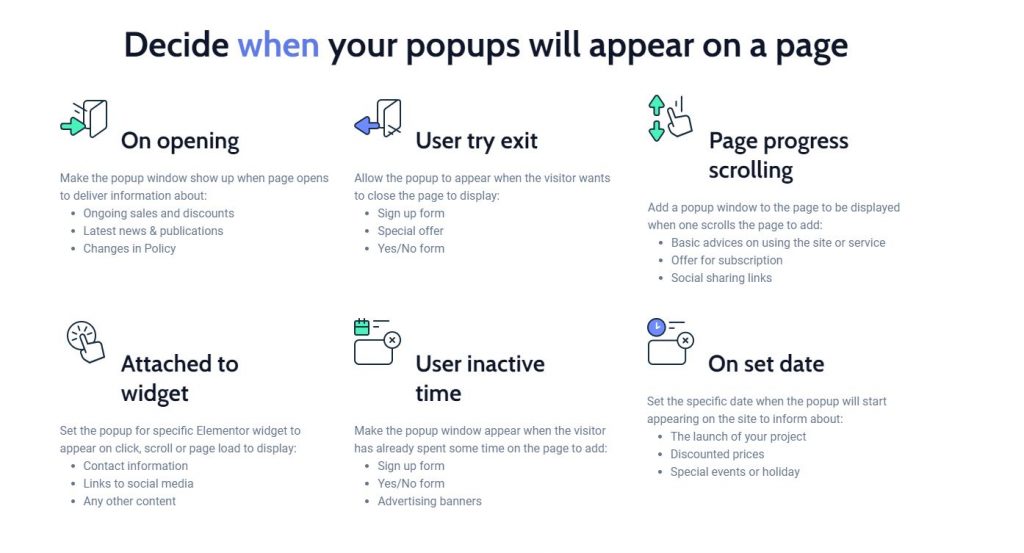

When creating popup we can set :
Display Condition :
There’s also Display Condition manager on which page should the popup triggered.
We can Set the Position (Horizontal & Vertial position), Size(px,full width, %) , and Animation of Popup appear.
Other than the display condition above, we can directly link the popup to a widget in Advance > Jet Popup. There’s some default setting of popup that we can use E.g :
Extra : To put Custom shape Popup, or put image outside the popup boundary, see instructions in the Classic Button

It may looks like that image is positioned outside the popup, but actually it’s inside.
The white background is just section with white background color & rounded border. The close icon X & Y axis is transformed to positioned lower.
The actual popup background is set to transparent because image can’t show up outside the popup boundary.
Oh, and you can put overlay color / image between the popup and the page.
You can use Popup Action Button Widget to close Popup.
Lorem ipsum dolor sit amet, consectetur adipiscing elit. Ut elit tellus, luctus nec ullamcorper mattis, pulvinar dapibus leo.
Lorem ipsum dolor sit amet, consectetur adipiscing elit. Ut elit tellus, luctus nec ullamcorper mattis, pulvinar dapibus leo.
Lorem ipsum dolor sit amet, consectetur adipiscing elit. Ut elit tellus, luctus nec ullamcorper mattis, pulvinar dapibus leo.
Lorem ipsum dolor sit amet, consectetur adipiscing elit. Ut elit tellus, luctus nec ullamcorper mattis, pulvinar dapibus leo.
Lorem ipsum dolor sit amet, consectetur adipiscing elit. Ut elit tellus, luctus nec ullamcorper mattis, pulvinar dapibus leo.
Lorem ipsum dolor sit amet, consectetur adipiscing elit. Ut elit tellus, luctus nec ullamcorper mattis, pulvinar dapibus leo.
Lorem ipsum dolor sit amet, consectetur adipiscing elit. Ut elit tellus, luctus nec ullamcorper mattis, pulvinar dapibus leo.
Lorem ipsum dolor sit amet, consectetur adipiscing elit. Ut elit tellus, luctus nec ullamcorper mattis, pulvinar dapibus leo.
Lorem ipsum dolor sit amet, consectetur adipiscing elit. Ut elit tellus, luctus nec ullamcorper mattis, pulvinar dapibus leo.
Lorem ipsum dolor sit amet, consectetur adipiscing elit. Ut elit tellus, luctus nec ullamcorper mattis, pulvinar dapibus leo.