Listing Grid - Testing Ground Part 2 (Trickier)
Now, On part 1, we can see how easy it is to get the child, grandchild, etc of the current post using the macro function.
Problem is : Macro can only display child /grandchild, etc of the “Current post”.
e.g : we’re not in the “Test 1” page anymore, how to show the child post of “Test 1” Here?.
Way 1 : Relations are represented as meta data in both the parent & the child post. So we can :
- put the Child post Listing in the Listing grid
- set a Post Query – Meta query filter :
- set key (Name/ID) to : relation meta key (in this case : relation_897c4a2695e39a73419d78075e87af83)
- Set the value to : the post id of the parent. In this case 2292 (Post ID of Test 1)

Done! now the list will only show the child of Test 1 even if this is not in the Test 1 page.
Showing the Grandchild of a post that is not the "current post"
We can’t use the meta query filter for relation trick for the grand child since the grandparent relation key is not present in the grandchild. we’re going to use another trick this time.
Since nesting Listing grid works. We just create a Listings of Test Post Type, that only contain another Listing Grid of Grand Child Post Type – using grandchild macro relation. this is possible because the macro is called is called inside the listing and not in the current page.
Then we create a Listing Grid using that Test Post Type Listings that we made, and filter it using Posts Query – Posts & Author parameter – and set the id to the page of the page we want (In this case 2292, id of Test 1),
Hence : the listing grid will only show the Template for Test 1 > and inside the template, there’s a listing grid that called the grandchild of the “current post” in that contex, which is Test 1.
Note* : This Trick can be done with child post as well.
Dynamic Popup trick from listing grid.
- Create a Popup using Jet Popup, and put all the dynamic tag using dynamic fields / any other widget to grab the meta data, etc of the target post you want to get the data in the popup. Note that the data won’t be visible yet inside the Popup template.
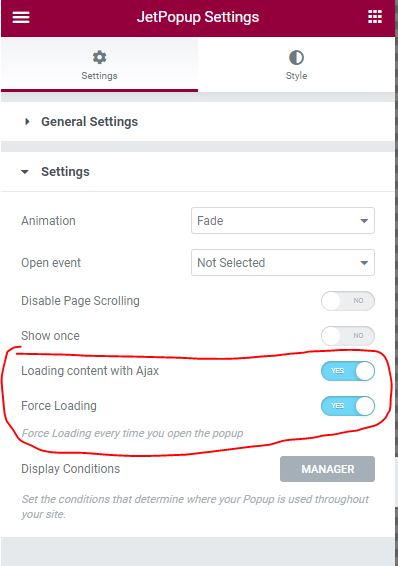
- Make sure in the JetPopup Settings, to enable loading content with Ajax & Force loading.
- Create a Listings, and inside the listing, put a widget you want to function as the trigger for the popup. E.g : Button
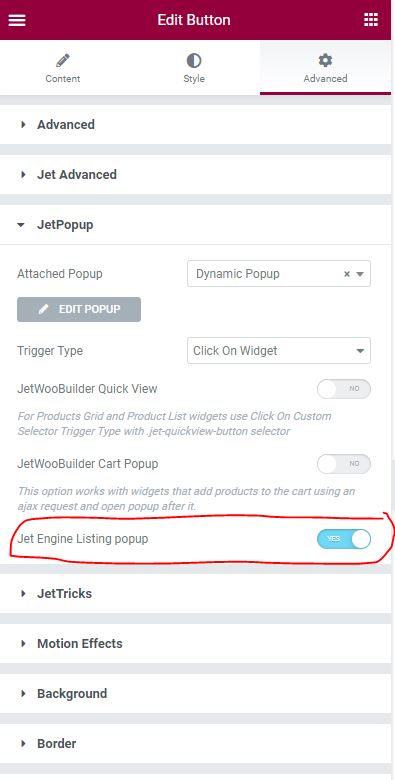
- In that Button > Advanced > JetPopup section, attach the popup you create in step 1, and remember to toggle the Jet Engine Listing Popup
- Now when you use the Listings inside the Listing grid and trigger the popup. The popup will get the metadata from the context of that template instead of the current post.
Working Example :