Filter for CPT - To Listing Grid
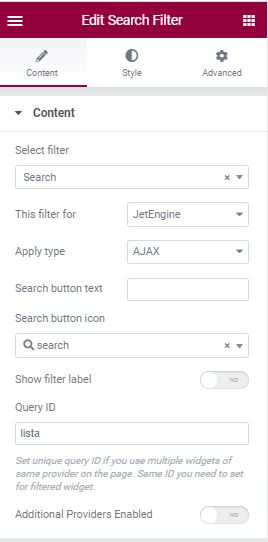
Summary :
To target the Listing Grid, select JetEngine for the filter target of jet smart filter. The filter work for normal query inside the listing grid (Post / Term / User query). Page Reload Doesn’t work with Query builder (Custom Query)
- Load more / Infinite Loading Doesn’t work with Query Builder ( Custom Query), Use Post / Term / User query inside the listing widget if you want to use those feature.
- there’s 3 Type of filter method :
– Ajax (No page reload)
Benefit : smooth, highest compatibility. Save bandwidth
Disadvantage : User don’t get URL to directly open filtered result page (e.g : open page 2)– Page reload ( good old ways )
Benefit : user can directly open filtered page (e.g : share link to page 2)
Disadvantage : Cluttered URL, need to press “Apply” to filter,
2 “search filter widget” crash the active filter widget, (search filter always use _s as query parameter, this doesn’t happen in Ajax)– Mixed (AJAX, but modify the url, so people can copy the url)
Benefit : Same benefit as ajax, and user get url to directly open filtered result
Disadvantage : the Url is cluttered. - If there’s more than 1 Listing grid to filter in a page (like this page), you can set the target (Query ID) of each filter. Query ID is just the CSS ID of the Listing Grid.
Before we start, : all 3 active filter widget will Still Respond on page reload even if it’s not meant for their respective listing grid. But the their target listing grid wont be affected and working normally.
Using AJAX
The Modern way to filter, test to search “e” in search, and “data” in search data, should be working normally.( 1 result – Best, best data)
Disadvantage / Advantage : after filtering, refresh the page (f5), the filter will be gone. Sometimes you don’t want people to directly link to filtered page (e.g : page 2 / filtered by name directly) since the product keeps changing, so better to use Ajax since people can’t link to filtered page directly.
Using Page Reload
The old ways , test to search “e” in search, and “data” in search data, Active filter would crash and don’t show anything, the list will filter “data” only because the “_s=e” in url is overwritten.
Benefit : test to search “e” and filter by number, even if you refresh the page, the filter still persist.
a
aa
after
Using Mixed
The best way if you can tolerate the cluttered URL, test to search “e” in search, and “data” in search data, should be working normally.( 1 result – Best, best data).
Benefit : we got the smoothness of ajax, and even if we refresh the page (f5), the filter still persist. Consider this if you don’t mind cluterred url.