Let’s Start From the easy part. Getting data related to the current page :
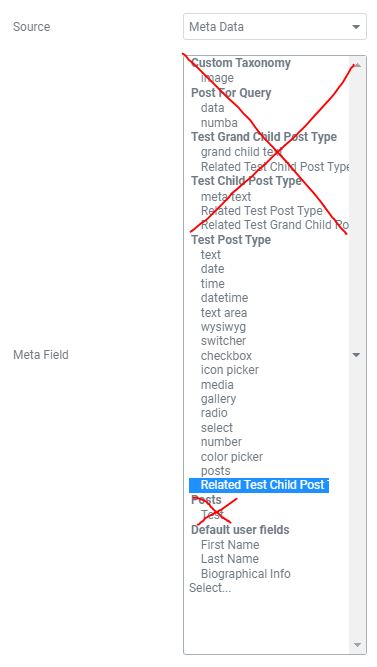
Using Dynamic Field Meta Data, it shown as if we can use ALL the custom meta data from other places even outside the current page. This is a common trap for new comer.
You can only grab the meta data from the Current Page Only. Or something that still related to this current page, (For example : Current User).
e.g : It’s shown as if we can choose meta data “Related Test Grand Children Post” from Test Child Post Type. But the current page is of type “Test Post Type” so you can’t actually get the data and will return blank.
Child
Using Meta Data – Related Test Post Type & Related Post List Field Output
Grandchild
Using Relation hierarchy to get the grandchildren of this post which we wouldn’t be able to grab otherwise.
Using Listings :
Test Child Post Type Listing : Post Query – Posts & Author Parameter – Using Jet Engine Macro (Related Children) : Getting Child of the current post.
No data was found
Test Grand Child Post Type Listing : Post Query – Posts & Author Parameter – Using Jet Engine Macro (Get Grandchild) : Getting Grandchild of the current post.
No data was found
Test Grand Child Post Type Listing (Listing Grid inside Listing Grid): We can Nest Listing Grid inside another listing grid. Post Query – Posts & Author Parameter – Using Jet Engine Macro (Related Children) : Getting Child of the current post. But inside the Template, there’s another Listing grid getting the child of each post (effectively getting the grand child)
No data was found
Taxonomy from current post
Listing Grid using Terms query using the %current_terms% macro.
Related Posts that have the same "terms" as current page
Listing Grid using Post Query – Tax Query using the %current_terms% macro to get post with the same term as current terms. Combined with Posts & Author Parameter – to exclude current id (using dynamic tag – macro).
Dynamic Field :
Post Title : Test 2
text : another custom text
date : 16 July, 2021
time : 03:00 am
datetime : 06:00 am, 4 July 2021
text area : some other text area
wysiwyg :
another wysiwyg content
switcher :
checkbox :
icon picker :
radio : 1
select : 1
number : 100
color picker : #9e9e9e
posts :
media : https://demo.jamesthe.com/wp-content/uploads/2021/07/pennant-1.jpg